Example Edge Craft Retrieval-Augmented Generation Deployment on Intel® Arc® Platform
This document outlines the deployment process for Edge Craft Retrieval-Augmented Generation service on Intel® Arc® Platform. This example includes the following sections:
EdgeCraftRAG Quick Start Deployment: Demonstrates how to quickly deploy a Edge Craft Retrieval-Augmented Generation service/pipeline on Intel® Arc® Platform.
EdgeCraftRAG Docker Compose Files: Describes some example deployments and their docker compose files.
EdgeCraftRAG Service Configuration: Describes the service and possible configuration changes.
EdgeCraftRAG Quick Start Deployment
This section describes how to quickly deploy and test the EdgeCraftRAG service manually on Intel® Arc® platform. The basic steps are:
1. Prerequisites
EC-RAG supports vLLM deployment(default method) and local OpenVINO deployment for Intel Arc GPU and Core Ultra Platform. Prerequisites are shown as below:
Core Ultra
OS: Ubuntu 24.04 or newer
Driver & libraries: Please refer to Installing Client GPUs on Ubuntu Desktop
Available Inferencing Framework: openVINO
Intel Arc B60
OS: Ubuntu 25.04 Desktop (for Core Ultra and Xeon-W), Ubuntu 25.04 Server (for Xeon-SP).
Driver & libraries: Please refer to Install Bare Metal Environment for detailed setup
Available Inferencing Framework: openVINO, vLLM
Intel Arc A770
OS: Ubuntu Server 22.04.1 or newer (at least 6.2 LTS kernel)
Driver & libraries: Please refer to Installing GPUs Drivers for detailed driver & libraries setup
Available Inferencing Framework: openVINO, vLLM
2. Access the Code
Clone the GenAIExample repository and access the EdgeCraftRAG Intel® Arc® platform Docker Compose files and supporting scripts:
git clone https://github.com/opea-project/GenAIExamples.git
cd GenAIExamples/EdgeCraftRAG
NOTE: If you want to checkout a released version, such as v1.5:
git checkout v1.5
3. Run quick_start.sh
Run quick start script from the EdgeCraftRAG root directory:
./tools/quick_start.sh
The script is located in the tools directory. For detailed usage of quick_start.sh and build_images.sh, please refer to tools/README.md.
By default, this script starts local OpenVINO deployment when no environment variables are configured.
If you prefer manual model preparation, env setup, and docker compose options, please refer to Manual deployment details in Advanced Setup.
4. Access UI
Open your browser, access http://${HOST_IP}:8082
After startup completes, quick_start.sh will print:
Service launched successfully.
UI access URL: http://${HOST_IP}:8082
If you are accessing from another machine, replace ${HOST_IP} with your server's reachable IP or hostname.
Your browser should be running on the same host of your console, otherwise you will need to access UI with your host domain name instead of ${HOST_IP}.
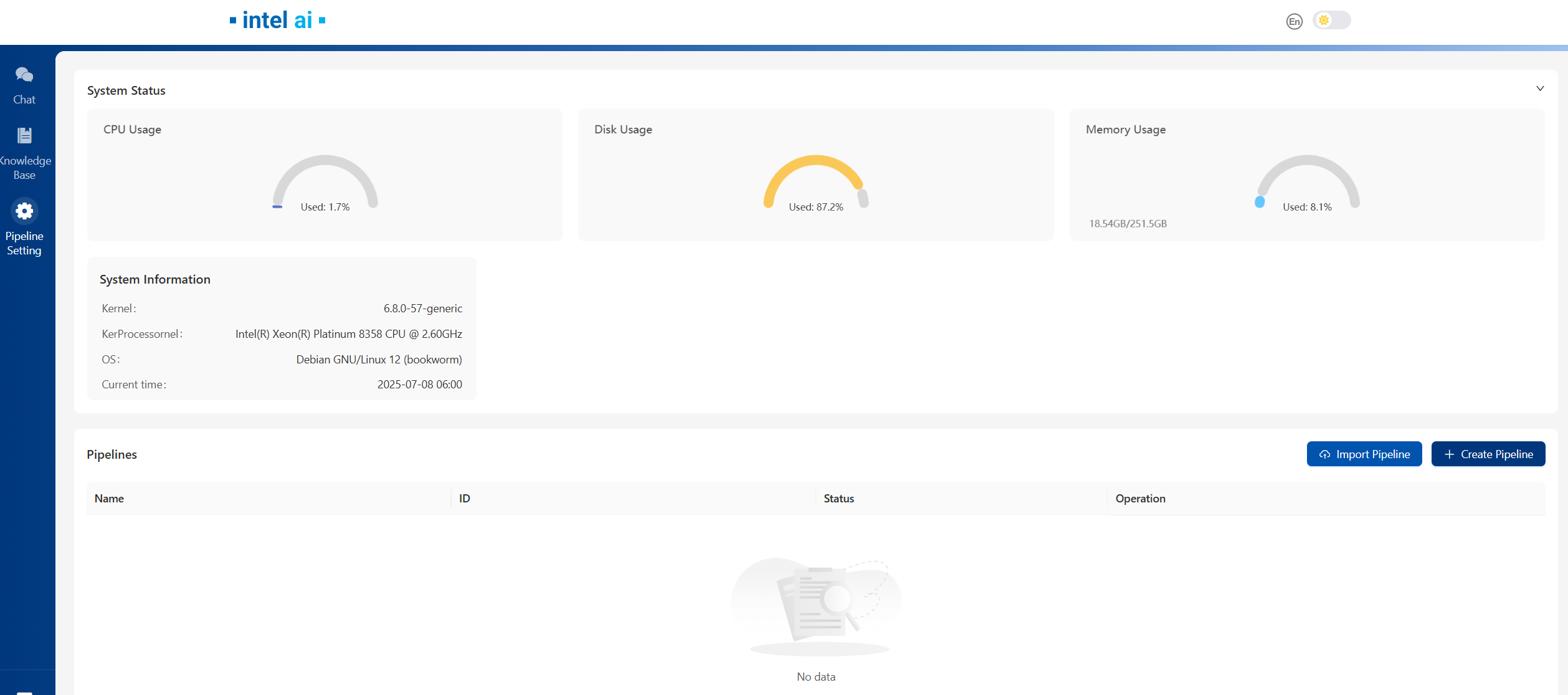
Below is the UI front page, for detailed operations on UI and EC-RAG settings, please refer to Explore_Edge_Craft_RAG
5. Cleanup the Deployment
To stop the containers associated with the deployment, execute the helper script command:
./tools/quick_start.sh cleanup
All the EdgeCraftRAG containers will be stopped and then removed on completion.
If you prefer the manual docker compose cleanup command, please refer to Manual cleanup details in Advanced Setup.
EdgeCraftRAG Docker Compose Files
The compose.yaml is default compose file using tgi as serving framework
Service Name |
Image Name |
|---|---|
etcd |
quay.io/coreos/etcd:v3.5.5 |
minio |
minio/minio:RELEASE.2023-03-20T20-16-18Z |
milvus-standalone |
milvusdb/milvus:v2.4.6 |
edgecraftrag-server |
opea/edgecraftrag-server:latest |
edgecraftrag-ui |
opea/edgecraftrag-ui:latest |
ecrag |
opea/edgecraftrag:latest |
EdgeCraftRAG Service Configuration
The table provides a comprehensive overview of the EdgeCraftRAG service utilized across various deployments as illustrated in the example Docker Compose files. Each row in the table represents a distinct service, detailing its possible images used to enable it and a concise description of its function within the deployment architecture.
Service Name |
Possible Image Names |
Optional |
Description |
|---|---|---|---|
etcd |
quay.io/coreos/etcd:v3.5.5 |
No |
Provides distributed key-value storage for service discovery and configuration management. |
minio |
minio/minio:RELEASE.2023-03-20T20-16-18Z |
No |
Provides object storage services for storing documents and model files. |
milvus-standalone |
milvusdb/milvus:v2.4.6 |
No |
Provides vector database capabilities for managing embeddings and similarity search. |
edgecraftrag-server |
opea/edgecraftrag-server:latest |
No |
Serves as the backend for the EdgeCraftRAG service, with variations depending on the deployment. |
edgecraftrag-ui |
opea/edgecraftrag-ui:latest |
No |
Provides the user interface for the EdgeCraftRAG service. |
ecrag |
opea/edgecraftrag:latest |
No |
Acts as a reverse proxy, managing traffic between the UI and backend services. |